Messaging Rebuilt

Launch chat rooms, messenger, and member activity from one polished front door.

The old stylesheet is gone. This refreshed Tailwind-based product shell gives CuteChat a cleaner landing flow, brighter calls to action, and a more adaptable UI for future feature work.

Private messaging Presence and profiles Moderated chat rooms Browser-only experience
Experience
Browser-first
No app install, no plugins, just a smoother web chat journey.
Setup
Admin-ready
Create rooms, manage members, and tune roles from the built-in console.
Stack
Tailwind CSS
A utility-first foundation makes future UI changes faster and more consistent.
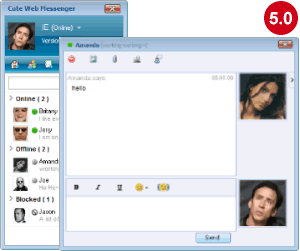
CuteChat messenger preview
Quick start
Sign in with the default administrator account, open the chat admin console, and create one or more lobbies before inviting members in.
Username admin
Password admin
Chat room preview
Feature-rich chat rooms
Moderate live conversations, manage lobby activity, and keep community spaces organized without leaving the browser.
Messenger preview
Private messaging with presence
Give members a dedicated messenger experience for one-to-one chats, room follow-ups, and quick status checks.
Launch checklist
A few setup tasks get the whole community flowing:
  • Sign in as the administrator and review the member tools.
  • Create your first lobby in Chat Admin and confirm it appears in the chat directory.
  • Invite members to complete profiles so rooms and presence feel alive immediately.